

























How to Generate a WiFi QR Code
Here’s how to use the free WiFi QR code generator from Camcode.
Follow these four simple steps:
- Confirm QR Code — WiFi is selected as the symbology. It is preselected here; search the 27 types if you need a different one.
- Enter your network details: the SSID exactly as configured (network names are case sensitive), the encryption type, and the password. Tick Hidden Network if the SSID is not broadcast.
- Preview the live WiFi QR code, then scan it with your own phone to confirm it joins the network.
- Export a print-ready SVG for your label or sign artwork.
What is a WiFi QR Code?
A WiFi QR code is a QR code where the payload is a set of network credentials rather than a link. Scanning it with a phone camera prompts the device to join that network, so nobody has to type the password.
The QR symbology itself is standardized. ISO/IEC 18004:2024 specifies QR code encoding methods, symbol formats, error correction rules and the reference decoding algorithm. Masahiro Hara invented the format at Denso Wave in 1994 to track automotive parts, and the QR stands for Quick Response, not for any character limit.
The Wi-Fi payload is a different story. The string WIFI:T:WPA;S:MyNetwork;P:MyPassword;; is defined by no standards body. It began as a convention documented in ZXing, Google’s open-source barcode library, and spread from there to the Wi-Fi Alliance and every phone vendor. With nobody policing it, implementations drifted, which is why Android, GNOME and KDE emit a T:SAE encryption value the Wi-Fi Alliance never defined.
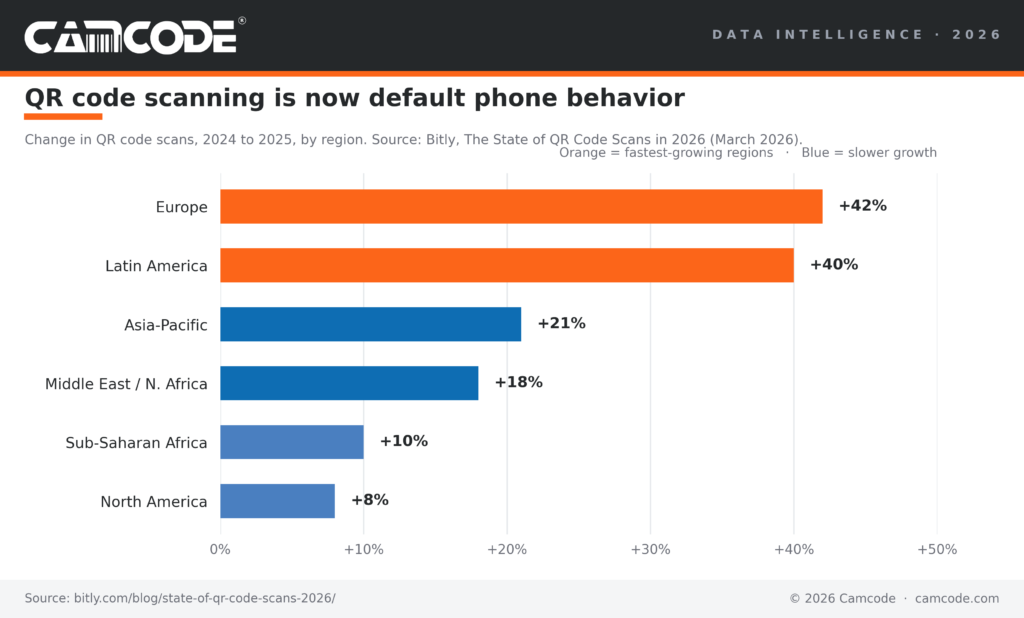
Scanning is where the growth is. QR code scans rose 42 percent across Europe and 8 percent in North America between 2024 and 2025, and Bitly notes scans are growing faster than new codes are being created, meaning printed codes already in the wild are being scanned more often rather than replaced.
QR Codes are Scanned More Than Printed
People scan QR codes far more often than they make them. QR code scans rose 42 percent across Europe and 8 percent in North America between 2024 and 2025, while creation of new QR codes grew only 7 percent in Europe and half a percent in Latin America over the same period, according to Bitly’s State of QR Code Scans in 2026. Bitly reports the same pattern across every region it measured: scans growing faster than new codes are created.
For a printed WiFi QR code that means the sign you put up this year gets scanned more next year, not less, which is an argument for printing it on something that survives the handling.

Need Barcode or QR Code Labels?
Camcode is a developer and manufacturer of customized, durable asset tracking labels and automatic data capture tracking solutions for applications where permanent identification is critical. With over 50 years experience, we can create the perfect tracking solution for your asset, facility, maintenance, or warehouse management project. Contact us now to how you can start tracking better today.
A Worldwide Leader in Durable Labels
The makers of labels that go anywhere.
From your utility box to outer space, Camcode’s durable pre-print barcode labels track millions of assets and locations across the globe.
Why do you need durable labels? Camcode’s asset tags improve the efficiency of asset tracking systems by eliminating human error. Our proprietary manufacturing processes and coating technologies offer the ultimate durability for practically every application.


Asset Tags Made Specifically for Your Application
Camcode has the experience to provide the right labels for any application. Learn more about our label offerings for your industry, or Contact Us to get help from one of our experienced sales engineers now.
Get a Free Barcode & QR Code Label Sample Kit
Request a free asset label sample kit today and we will send you a kit to test our extremely durable labels in your own operating environment.
Frequently Asked Questions:
A WiFi QR code is a QR code that connects a device to a wireless network when it is scanned. It contains the network name (SSID), the password and the security type, so nobody has to type the password.
When someone scans the code with their phone camera, the device decodes a plain text string in the form WIFI:T:WPA;S:Network;P:Password;; and prompts the user to join that network. No typing is required and the phone does not need an internet connection to read the code.
WiFi QR codes work well for:
- Cafes, restaurants and hotels
- Offices and coworking spaces
- Events and conferences
- Guest networks at home
- Warehouse and plant floors, where handheld scanners and tablets are re-provisioned often
Not all, but nearly all. iPhones on iOS 11 or later and Android devices on Android 10 or later scan WiFi QR codes from the built-in camera app. Android 9 and earlier need a scanner app or Google Lens. Windows and macOS can generate the codes but will not join a network by scanning one from a screen.
The code is only as safe as the network it points at. A WiFi QR code stores the password in readable plain text, so anyone who scans or photographs it has your credentials. Point it at a guest SSID with client isolation switched on, keep the printed code out of a street-facing window and rotate the password on a schedule.
Open the camera app, point it at the code and wait for the notification banner. Tap the banner and confirm when the phone asks whether to join the network. On Android you may need to open the camera’s QR mode or use Google Lens. You do not need an internet connection for this to work.
Yes. The generator on this page is free, has no signup and applies no watermark or scan limit. The code itself is a static image with no service behind it, so it keeps working whether or not this site does.
Be careful with tools that generate a “dynamic” WiFi QR code: those route the scan through a third-party server and stop working if that service does.
Yes. A WiFi QR code stores the credentials in the image itself, so scanning works with no internet connection on either device. That is the difference between a WIFI: string and a QR code that holds a link.
Yes, provided the code uses T:WPA as the encryption type. The Wi-Fi Alliance specification does not define T:SAE, even though several operating systems emit it when sharing a WPA3 network.
The generator on this page writes T:WPA, so one code covers WPA2 and WPA3.
Four causes account for nearly all of them.
- The SSID case does not match exactly.
The password contains a semicolon, comma, colon, backslash or quotation mark that was not escaped. - The network is hidden but the Hidden Network box was not ticked.
- Or the code was encoded as a URL rather than as a WIFI: string, which is what happens when network details are pasted into a generic text QR generator.
You can, but keep it small and central and re-scan the result on two phones before printing. QR codes carry error correction that tolerates a covered area of roughly 7 to 30 percent depending on the level used, and a logo that pushes past that produces a code which reads on a fresh phone screen and fails on a scratched one.
“Logo” appears in 110 monthly searches across this keyword set, so the question is common, but a printed code that fails at 20 percent of scans costs more than the branding is worth.
Keep Operations Efficient with Facility Management Asset Tags
Find exactly what you need. And, if you don’t find it, build it with Camcode. Talk to our team today.