



















How to Generate a Code 11 Barcode
Here’s how to use the free, online Code 11 barcode generator from Camcode.
Follow these four simple steps:
- Confirm Code 11 is selected as the symbology. It is preselected here; search the 27 types if your system expects a different code.
- Type your data into Barcode Contents using only the digits 0 to 9 and the dash (-). Code 11 was designed for short numeric part and serial numbers, so keep the message as short as your system allows.
- Preview the live Code 11 barcode. Decide on check digits before you print: the specification calls for one check digit (C) on data under 10 characters and two (C and K) on data of 10 characters or more, and the scanner that will read the label must be set to expect the same number.
- Download the barcode as a print-ready SVG for your label artwork. For labels that stay on telecom equipment for years, see Camcode’s telecom asset tags.
What is a Code 11 Barcode?
Code 11 is a discrete, linear (1D) barcode symbology that encodes the digits 0 to 9 and the dash, 11 characters in all, which is where the name comes from. Intermec developed it in 1977 for Bell Labs to track small telephone components; it is also known as USD-8.
Each character is three bars and two spaces, an asterisk start/stop character frames the message and a symbol can hold any number of characters.
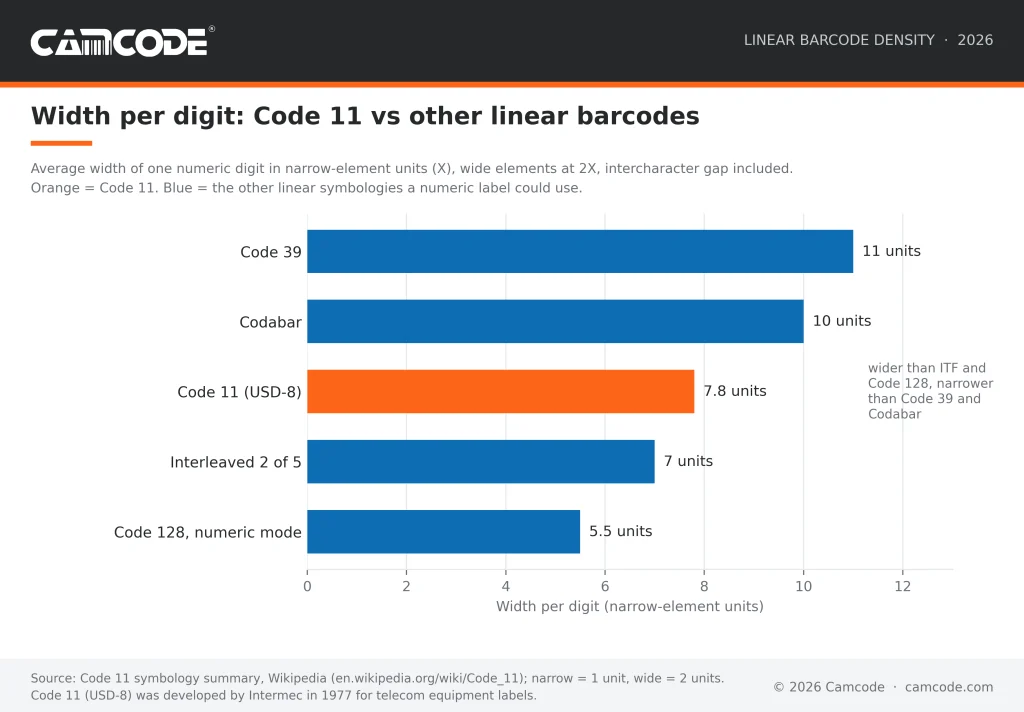
Code 11 is dense for a numeric code: at a 2:1 ratio the average digit is 7.8 units wide, narrower than Codabar (10) or Code 39 (11) but wider than Interleaved 2 of 5 (7) or Code 128 in numeric mode (5.5). That density is also why it misreads easily, since a small print flaw can turn one valid character into another.
The specification compensates with one modulo 11 check digit for data under 10 characters and two for 10 or more.
Code 11 is a legacy symbology today. It has no ISO/IEC standard, most scanners ship with it off (Zebra’s DataWedge does not enable Code 11 by default) and Code 128 carries the same digits in less space with a mandatory check character.
Use this generator when an existing telecom, inventory or maintenance system still expects Code 11. For a new numeric label, start with the Code 128 barcode generator. For how every linear symbology compares, see Camcode’s complete guide to barcode types and standards.
Code 11 vs Code 39 vs Code 128: Which Should You Use?
Code 11, Code 39 and Code 128 can all encode a numeric part number, so the choice comes down to width, error checking and scanner support.
- Width first: at a 2:1 ratio a digit costs 7.8 units in Code 11, 11 units in Code 39 and 5.5 units in Code 128, so a 12-digit serial number is roughly 30 percent narrower in Code 11 than in Code 39 and about 40 percent wider than in Code 128.
- Error checking next: Code 39 is self-checking with no check digit, Code 11 relies on optional C and K check digits and Code 128 builds a mandatory modulo 103 check character into every symbol.
- Scanner support last: Code 39 and Code 128 are enabled on virtually every scanner out of the box, while Code 11 usually has to be turned on in the scanner’s configuration.
The practical rule: choose Code 11 only when the system reading the label already expects it. Choose Code 39 when you need letters and a symbology every legacy scanner reads without setup. Choose Code 128 for any new numeric or alphanumeric label where space and built-in error checking matter.
The chart below shows the width each linear symbology needs per digit.

Need Barcode or QR Code Labels?
Camcode is a developer and manufacturer of customized, durable asset tracking labels and automatic data capture tracking solutions for applications where permanent identification is critical. With over 50 years experience, we can create the perfect tracking solution for your asset, facility, maintenance, or warehouse management project. Contact us now to how you can start tracking better today.
A Worldwide Leader in Durable Labels
The makers of labels that go anywhere.
From your utility box to outer space, Camcode’s durable pre-print barcode labels track millions of assets and locations across the globe.
Why do you need durable labels? Camcode’s asset tags improve the efficiency of asset tracking systems by eliminating human error. Our proprietary manufacturing processes and coating technologies offer the ultimate durability for practically every application.


Asset Tags Made Specifically for Your Application
Camcode has the experience to provide the right labels for any application. Learn more about our label offerings for your industry, or Contact Us to get help from one of our experienced sales engineers now.
Get a Free Barcode & QR Code Label Sample Kit
Request a free asset label sample kit today and we will send you a kit to test our extremely durable labels in your own operating environment.
Frequently Asked Questions:
Code 11 is a linear (1D) barcode symbology that encodes the digits 0 to 9 and the dash character, framed by an asterisk start/stop character, with one or two optional modulo 11 check digits. Intermec introduced it in 1977 for telecommunications equipment labeling, and it is also known as USD-8.
A Code 11 barcode can encode 11 characters: the numbers 0 to 9 and the dash (-). A twelfth symbol, the asterisk, is the start/stop character and is not part of the data. If you need letters, spaces or punctuation, use Code 39 or Code 128 instead.
Code 11 barcodes are used in:
- Telecommunications equipment labeling, the application it was designed for
- Legacy inventory systems that key on numeric identifiers
- Industrial tracking applications whose scanners and software were configured for Code 11 years ago.
New deployments rarely choose it, so most Code 11 labels printed today replace or extend an existing set.
Key benefits include:
- A compact numeric symbol (about 7.8 units per digit at a 2:1 ratio, narrower than Code 39 or Codabar)
- A simple format that is easy to generate and print on any thermal or laser printer
- Variable length, so part numbers of any length fit
- Optional C and K check digits for error detection
Code 11 has several limitations:
- A character set of only digits and the dash
- Low security, because a printing flaw can turn one valid character into another, which is why check digits are recommende
- No ISO/IEC standard
- Weaker scanner support than Code 39 or Code 128, since most scanners ship with Code 11 disabled and must be configured to read it
Code 11 uses up to two modulo 11 check digits, called C and K.
- To calculate C, give the rightmost data character a weight of 1, the next 2 and so on up to 10, then start again at 1; multiply each character’s value by its weight (the dash counts as 10), add the products and divide by 11. The remainder is C.
- To calculate K, append C to the data and repeat the process with weights that run from 1 to 9 before cycling; the remainder is K.
The specification recommends C alone for data under 10 characters and both C and K for data of 10 characters or more, per the BarTender documentation.
Worked example: for the data 0123456789, the weighted sum is 165, so C is 0; appending C and reweighting gives 201, so K is 3, and the printed message is 012345678903. A remainder of 10 is written as a dash.
When it comes to the difference between Code 11 vs Code 39:
- Code 11 encodes only digits and the dash and needs optional check digits to be reliable, while Code 39 encodes 43 characters (digits, capital letters and seven symbols) and is self-checking, so it needs no check digit.
- Code 11 is narrower per digit (7.8 units against 11 at a 2:1 ratio) but Code 39 is read by virtually every scanner without configuration.
Choose Code 39 for any label with letters or for a mixed scanner fleet; choose Code 11 only when an existing telecom or inventory system requires it. Make either symbol free with the Code 39 barcode generator or this page.
Excel has no built-in Code 11 barcode generator. To make Code 11 barcodes in Excel you need a Code 11 barcode font plus a formula or macro that computes the C and K check digits and adds the asterisk start/stop characters.
A label design application such as BarTender, NiceLabel or TEKLYNX does the same job from your spreadsheet column. For a one-off label, this free Code 11 generator is faster: type the number, preview the symbol and export an SVG you can place in any document.
Most scanners can read Code 11, but only after it is enabled. Scanner makers leave it off by default because it is rarely used: Zebra’s DataWedge, for example, enables Code 128, Code 39, UPC and EAN by default and leaves Code 11 disabled, with separate settings for whether the scanner verifies no, one or two check digits and whether it transmits them.
Before you print a batch of Code 11 labels, turn the symbology on in the scanner’s configuration and set the check digit options to match the labels.
Yes, and the download is free. This Code 11 barcode generator exports SVG, the vector format that stays sharp at any print size.
To download a PDF, open the SVG in a browser or a vector editor such as Inkscape or Adobe Illustrator and print or save to PDF. To get a PNG, export from the same editor at 300 dpi or higher so the narrow bars print cleanly.
Do not screenshot the preview: a screen capture is 72 to 96 dpi and the narrow bars of a Code 11 symbol will blur.
Code 11 is still read by most industrial scanners and still appears on telecom equipment and in older inventory systems, but it is a legacy symbology and is rarely chosen for new work. It has no ISO/IEC standard, its check digits are optional and Code 128 carries the same digits in about 30 percent less width with a mandatory check character.
Use Code 11 to match an existing system; use Code 128 or Interleaved 2 of 5 for anything new.
Keep Operations Efficient with Facility Management Asset Tags
Find exactly what you need. And, if you don’t find it, build it with Camcode. Talk to our team today.